The holiday season is prime time for social media engagement. Whether you’re sharing family moments, promoting your business, or running holiday campaigns, your images need to be perfectly optimized for each platform. A poorly optimized image can hurt your engagement, look unprofessional, or even get rejected by the platform.
In this comprehensive guide, we’ll cover everything you need to know about optimizing images for Instagram, Facebook, and Twitter during the holiday season—including platform-specific requirements, compression strategies, and format conversion tips.
Why Social Media Image Optimization Matters?
Before we dive into the specifics, let’s understand the impact:
- Higher Engagement: Properly sized images get more likes, comments, and shares
- Better Algorithm Performance: Optimized images perform better in platform algorithms
- Professional Appearance: Well-optimized images look more polished
- Faster Loading: Smaller files load faster, reducing bounce rates
- Cost Savings: Optimized images use less data (important for mobile users)
Platform-Specific Image Requirements
Instagram Image Optimization
Instagram is visual-first, making image optimization crucial.
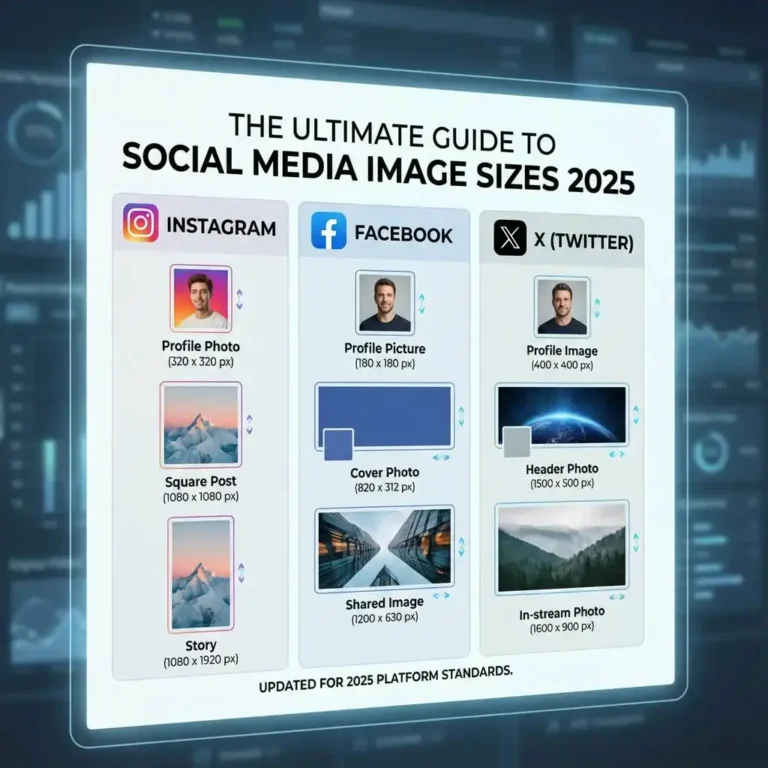
Instagram Feed Posts
Square Posts (1:1):
- Dimensions: 1080x1080px (minimum 600x600px)
- Aspect Ratio: 1:1
- File Size: Under 8 MB (aim for under 500 KB)
- Format: JPEG or PNG
- Quality: 85-90%
Portrait Posts (4:5):
- Dimensions: 1080x1350px
- Aspect Ratio: 4:5
- File Size: Under 8 MB (aim for under 500 KB)
- Format: JPEG
- Quality: 85-90%
Landscape Posts (1.91:1):
- Dimensions: 1080x566px
- Aspect Ratio: 1.91:1
- File Size: Under 8 MB (aim for under 500 KB)
- Format: JPEG
- Quality: 85-90%
Instagram Stories
- Dimensions: 1080x1920px
- Aspect Ratio: 9:16 (vertical)
- File Size: Under 8 MB
- Format: JPEG or PNG
- Quality: 85%
Instagram Reels Cover Image
- Dimensions: 1080x1920px
- Aspect Ratio: 9:16
- File Size: Under 8 MB
- Format: JPEG
- Quality: 85%
Instagram Profile Picture
- Dimensions: 320x320px same as Facebook profile resolution (displays as 110x110px)
- Aspect Ratio: 1:1
- File Size: Under 100 KB
- Format: JPEG or PNG
- Quality: 90%
Pro Tip: Use resizeimage.io to quickly resize your holiday photos to Instagram’s exact requirements. The free tool supports WebP, PNG, JPG, and TIFF formats, making it perfect for social media optimization.
Facebook Image Optimization
Facebook has different requirements for different post types.
Facebook Feed Posts
Single Image:
- Dimensions: 1200x630px (recommended)
- Aspect Ratio: 1.91:1
- File Size: Under 8 MB
- Format: JPEG or PNG
- Quality: 80-85%
Square Image:
- Dimensions: 1200x1200px
- Aspect Ratio: 1:1
- File Size: Under 8 MB
- Format: JPEG
- Quality: 85%
Facebook Cover Photo
- Dimensions: 1640x859px (displays as 820x312px on desktop)
- Aspect Ratio: 1.91:1
- File Size: Under 100 KB (for faster loading)
- Format: JPEG
- Quality: 85%
Facebook Profile Picture
- Dimensions: 400x400px (displays as 170x170px)
- Aspect Ratio: 1:1
- File Size: Under 100 KB
- Format: JPEG or PNG
- Quality: 90%
Facebook Stories
- Dimensions: 1080x1920px
- Aspect Ratio: 9:16
- File Size: Under 8 MB
- Format: JPEG or PNG
- Quality: 85%
Facebook Event Cover Photo
- Dimensions: 1920x1005px
- Aspect Ratio: 1.91:1
- File Size: Under 100 KB
- Format: JPEG
- Quality: 85%
Twitter/X Image Optimization
Twitter has specific requirements that differ from other platforms.
X Feed Images
Single Image:
- Dimensions: 1200x675px (recommended)
- Aspect Ratio: 16:9
- File Size: Under 5 MB (aim for under 500 KB)
- Format: JPEG, PNG, or WebP
- Quality: 80-85%
Multiple Images:
- Dimensions: 1200x675px each
- Aspect Ratio: 16:9
- File Size: Under 5 MB each
- Format: JPEG
- Quality: 80%
X Header Image
- Dimensions: 1500x500px
- Aspect Ratio: 3:1
- File Size: Under 5 MB (aim for under 200 KB)
- Format: JPEG or PNG
- Quality: 85%
X Profile Picture
- Dimensions: 400x400px (displays as 200x200px)
- Aspect Ratio: 1:1
- File Size: Under 2 MB (aim for under 100 KB)
- Format: JPEG or PNG
- Quality: 90%
Holiday-Specific Optimization Strategies
Christmas & Holiday Campaigns
Color Optimization:
- Holiday images often have rich reds and greens
- These colors can increase file size
- Use 85% quality to balance color richness and file size
- Consider WebP format for better compression of colorful images
Text Overlays:
- If adding holiday text, use PNG format
- Keep text areas sharp (90% quality)
- Compress background areas separately if possible
Holiday Graphics:
- Convert to PNG if transparency needed
- Use JPEG for photos with graphics overlays
- Optimize graphics separately from photos
Cross-Platform Posting
When posting the same content across platforms:
- Create Platform-Specific Versions: Don’t use one size for all
- Maintain Aspect Ratios: Each platform has preferred ratios
- Optimize File Sizes: Smaller for Twitter, larger for Instagram
- Test Before Posting: Preview on each platform
Quick Workflow:
- Start with high-quality original (2000px+)
- Create Instagram version (1080x1080px or 1080x1350px)
- Create Facebook version (1200x630px)
- Create Twitter version (1200x675px)
- Compress each to platform-appropriate size
Format Conversion for Social Media
JPEG vs. PNG vs. WebP
JPEG Format:
- Best For: Photos, complex images, most social posts
- Advantages: Universal support, good compression
- Use When: Posting photos, colorful images, general content
PNG Format:
- Best For: Graphics, logos, images with text, transparency
- Advantages: Lossless quality, transparency support
- Use When: Adding text overlays, graphics, logos
WebP Format:
- Best For: Modern platforms, maximum compression
- Advantages: 25-35% smaller than JPEG, maintains quality
- Use When: Instagram (supports WebP), Facebook (supports WebP), Twitter (supports WebP)
Conversion Tips:
- Use resizeimage.io to convert between formats quickly
- Convert PNG to WebP for better compression
- Convert TIFF to JPEG for social media
- Always test WebP compatibility before bulk conversion
Compression Best Practices
Quality Settings by Platform
Instagram:
- Feed Posts: 85-90% quality
- Stories: 85% quality
- Reels: 85% quality
- Reason: Visual-first platform, quality matters
Facebook:
- Feed Posts: 80-85% quality
- Cover Photos: 85% quality (but compress file size)
- Stories: 85% quality
- Reason: Algorithm favors faster-loading content
Twitter:
- Feed Images: 80% quality
- Header: 85% quality
- Reason: File size limits and fast-scrolling feed
File Size Optimization
Target File Sizes:
- Instagram: Under 500 KB (under 8 MB limit)
- Facebook: Under 500 KB (under 8 MB limit)
- Twitter: Under 500 KB (under 5 MB limit)
Why Smaller is Better:
- Faster loading = better user experience
- Less data usage for mobile users
- Better algorithm performance
- Reduced bounce rates
Tools for Social Media Image Optimization
Quick & Free: resizeimage.io
Perfect For: Quick social media optimization
- ✅ Free, no sign-up required
- ✅ Secure processing
- ✅ Supports WebP, PNG, JPG, TIFF
- ✅ Fast results
- ✅ Perfect for holiday campaign prep
Workflow:
- Upload your holiday image
- Resize to platform-specific dimensions
- Compress to target file size
- Convert format if needed (e.g., to WebP)
- Download optimized image
Other Tools
Canva
- Pre-made social media templates
- Built-in optimization
- Downside: Requires account, some features paid
Buffer / Hootsuite
- Social media management + optimization
- Downside: Subscription required
Adobe Express
- Free social media templates
- Good optimization tools
- Downside: Watermark on free version
Holiday Social Media Checklist
Pre-Holiday Season
- Update profile pictures with holiday themes
- Create holiday cover photos for all platforms
- Prepare holiday campaign images in all sizes
- Optimize product images for holiday promotions
- Test image quality on mobile devices
- Create templates for consistent holiday branding
During Holiday Season
- Optimize daily posts before uploading
- Monitor engagement on optimized vs. unoptimized posts
- Adjust quality settings based on performance
- Keep file sizes optimized for mobile users
- Test new formats (WebP) on each platform
Post-Holiday
- Analyze which image sizes performed best
- Document successful optimization strategies
- Update templates for next year
- Archive holiday images (optimized versions)
Common Mistakes to Avoid
- Using One Size for All Platforms: Each platform has different requirements
- Ignoring File Size: Large files hurt engagement
- Wrong Aspect Ratios: Images get cropped awkwardly
- Over-Compression: Images look pixelated or blurry
- Not Testing on Mobile: Most users view on mobile devices
- Forgetting Alt Text: Important for accessibility and SEO
- Using Wrong Formats: PNG for photos (too large), JPEG for graphics (no transparency)
Advanced Tips for Holiday Campaigns
A/B Testing Image Sizes
Test different optimizations:
- Try 80% vs. 85% quality
- Test WebP vs. JPEG
- Compare different aspect ratios
- Measure engagement differences
Batch Processing Holiday Content
For holiday campaigns with multiple images:
- Organize by Platform: Create folders for Instagram, Facebook, Twitter
- Use Consistent Settings: Same quality and dimensions per platform
- Process in Batches: Use resizeimage.io for quick batch optimization
- Verify Before Posting: Check each image before scheduling
Mobile-First Optimization
Since most social media is viewed on mobile:
- Test on Actual Devices: Don’t just check desktop
- Optimize for Small Screens: Ensure text is readable
- Consider Data Usage: Smaller files = less data
- Fast Loading Priority: Mobile users have less patience
Measuring Success
Track these metrics to measure optimization success:
- Engagement Rate: Likes, comments, shares per post
- Reach: How many people see your posts
- Click-Through Rate: Links in posts
- Load Time: How fast images appear
- File Size: Average file sizes of posted images
- Platform-Specific Metrics: Instagram Insights, Facebook Analytics, Twitter Analytics
Conclusion
Optimizing images for social media during the holiday season can significantly boost your engagement and make your content stand out. By understanding each platform’s requirements and using the right tools, you can create perfectly optimized holiday content that performs well across all channels.
Key Takeaways:
- Each platform has specific size requirements—don’t use one size for all
- Compress images to 80-85% quality for best balance
- Use WebP format when possible for better compression
- Keep file sizes under 500 KB for faster loading
- Test on mobile devices before posting
- Use free tools like resizeimage.io for quick optimization
This holiday season, don’t let poorly optimized images hurt your social media performance. Start optimizing your holiday content today with resizeimage.io—it’s free, secure, and supports all the formats you need (WebP, PNG, JPG, and TIFF).
Ready to optimize your holiday social media images? Visit resizeimage.io and start creating perfectly sized, compressed, and converted images for Instagram, Facebook, and X today!
Pro Tip: Create a holiday social media optimization workflow using resizeimage.io. Bookmark it on your phone and computer for instant access whenever you need to optimize holiday posts. No sign-up required—just upload, optimize, and post!