
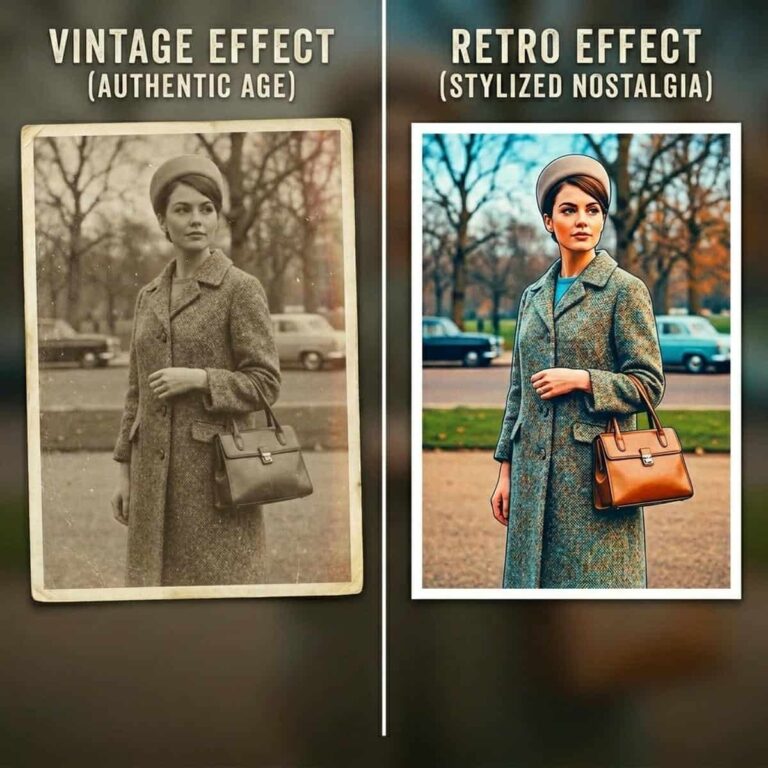
Vintage and retro photo filters both create a nostalgic look, but they are not exactly the same. If you want an Instagram story, playlist cover, album artwork, profile post, or memory-style edit to feel older, choosing the right filter can change the whole mood.
The short answer: use a vintage photo filter when you want a photo to look genuinely aged, faded, or film-worn. Use a retro photo effect when you want a bold throwback style inspired by a past decade.
Quick Comparison
| Filter style | Best for | Typical look |
|---|---|---|
| Vintage | Making photos look old, faded, or archival | Soft contrast, muted colors, grain, warmth, worn tones |
| Retro | Creating a decade-inspired aesthetic | Strong color casts, punchy tones, stylized contrast, playful nostalgia |
What Is a Vintage Photo Filter?
A vintage photo filter is designed to make a modern image feel older. It often adds faded colors, lower contrast, film grain, warm tones, light leaks, or a slightly worn texture.
This is the better choice if you want your photo to look like it came from an old family album, film camera, postcard, printed photo, or archived memory.
Vintage works especially well for portraits, travel shots, wedding memories, street photography, lifestyle images, and soft nostalgic edits.
What Is a Retro Photo Effect?
A retro photo effect is more about style than age. It borrows the visual mood of past decades, such as the 70s, 80s, 90s, or early 2000s.
Retro filters may use bold colors, heavy saturation, strong shadows, flash-style contrast, neon tones, faded poster colors, or analog-inspired effects. The result may not look naturally old, but it can feel instantly nostalgic.
Retro is a great choice for album covers, music artwork, Instagram stories, fashion posts, event flyers, party graphics, and creative social edits.
Which One Makes Photos Look Older?
If your goal is to make a photo look genuinely older, choose a vintage photo filter.
Vintage filters usually create a more believable old photo look because they imitate aging, film softness, printed-photo fading, and time-worn color. Retro filters can still feel nostalgic, but they often look more stylized, colorful, or trend-based.
Use vintage for an old memory effect. Use retro for a throwback aesthetic.
When to Use Vintage effect?
Choose vintage when you want:
- A faded old photo look
- A soft film simulation
- A warm nostalgic filter
- A family-album or travel-memory mood
- A subtle edit that feels emotional and timeless
Vintage filters are usually better when the photo should feel personal, sentimental, or naturally aged.
When to Use Retro filter?
Choose retro when you want:
- A bold nostalgic filter
- A decade-inspired social media look
- A colorful album cover aesthetic
- A more graphic or stylized edit
- A playful throwback mood
Retro filters are usually better when the image should feel designed, energetic, or connected to a specific era.
Few Tips for Content Creators using Instagram Stories and Album Covers
For Instagram stories, vintage filters work well with soft portraits, coffee shots, travel photos, handwritten text, and quiet lifestyle moments. They make the image feel personal without overpowering it.
For album covers, retro effects often stand out more. Strong color, contrast, and decade-inspired styling can help the artwork feel intentional and memorable.
If you are unsure, try both. A vintage version may feel more emotional, while a retro version may feel more expressive.
Try Vintage and Retro Tools Now!
Ready to create the look? Use the Vintage & Retro filters to test both styles on the same photo. Compare the old photo look, nostalgic filter, and film simulation effects side by side, then choose the version that fits your story, post, or album cover best.